AI Chat
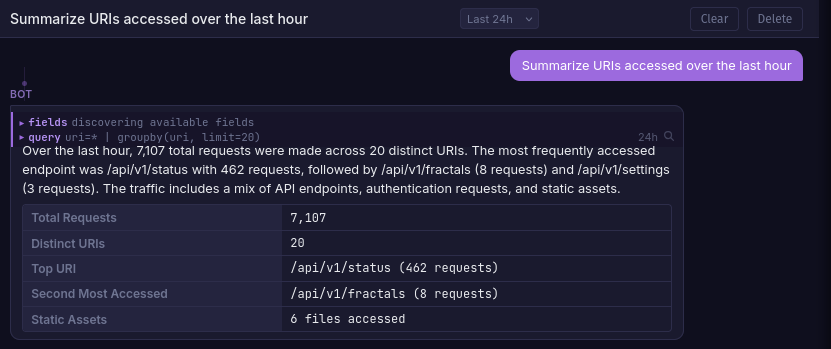
LLM-powered chat assistant scoped to each fractal. It queries your logs using Quandrix, discovers fields, and presents structured findings in a conversational interface.
Setup
Chat requires a LiteLLM proxy container and an API key for at least one supported provider (OpenAI, Anthropic, etc).
1. Configure a model
Edit litellm-config.yaml in the project root:
model_list:
  - model_name: strix-chat
    litellm_params:
      model: anthropic/claude-haiku-4-5-20251001
      api_key: os.environ/ANTHROPIC_API_KEY
      drop_params: true
2. Set environment variables
export ANTHROPIC_API_KEY=sk-ant-...
export LITELLM_MASTER_KEY=sk-strix-internal-key   # any secret string
export LITELLM_MODEL=strix-chat                   # must match model_name above
LITELLM_MODEL on the strix service controls which model is used. Defaults to strix-chat-anthropic.
3. Start the stack
docker compose up -d
LiteLLM runs on the internal Docker network only and is not exposed to the host.
Features
- Per-fractal conversations scoped to the selected fractal's log data
- Tool use via
run_query(Quandrix) andget_fieldsto explore logs - Streaming responses token-by-token via SSE
- Time range control from a selector in the chat header
- Multiple conversations with create, rename, and delete support
- Search integration by clicking the magnifying glass on any query tool call
Tip
Importing an alert feed gives the assistant context on your detection rules, enabling it to write more relevant Quandrix queries for your environment.
Supported Providers
Any provider supported by LiteLLM works. Add entries to litellm-config.yaml:
model_list:
  - model_name: strix-chat-openai
    litellm_params:
      model: openai/gpt-4o-mini
      api_key: os.environ/OPENAI_API_KEY

  - model_name: strix-chat-anthropic
    litellm_params:
      model: anthropic/claude-haiku-4-5-20251001
      api_key: os.environ/ANTHROPIC_API_KEY
      drop_params: true
Then set LITELLM_MODEL to whichever model_name you want to use.